Smart Hot Tub Controller: How to Add App Control to Your Spa

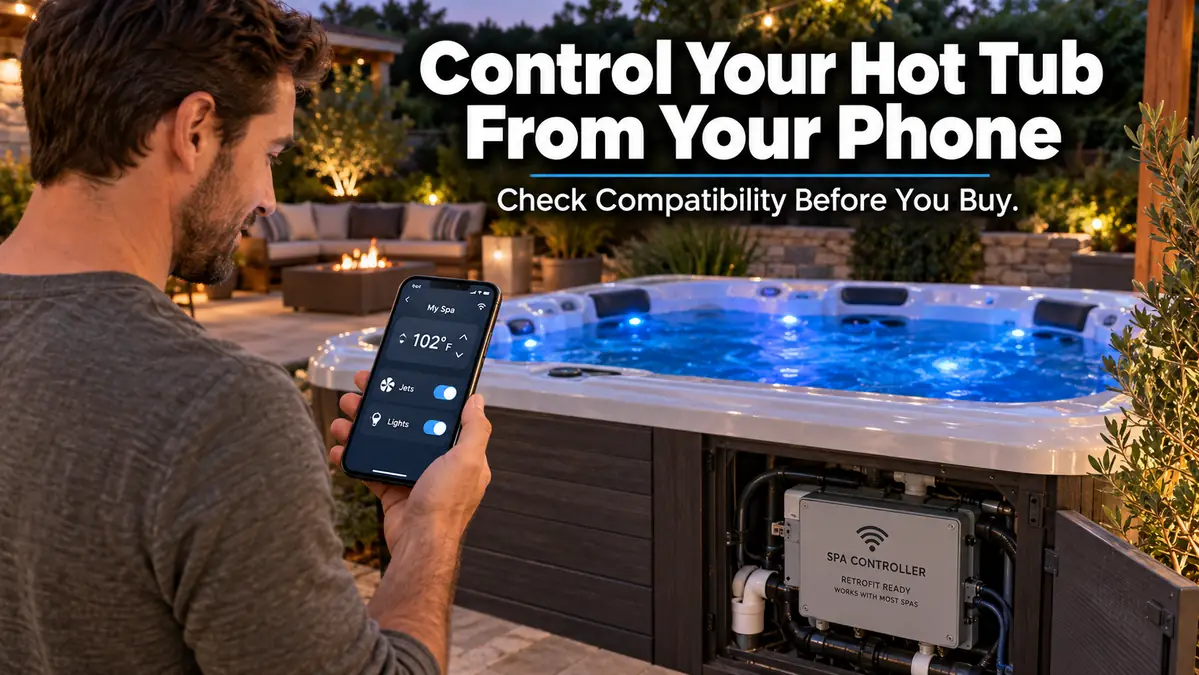
A smart hot tub controller lets you check or change spa settings from a phone instead of walking outside to the topside panel. Depending on the system, remote features may include temperature, pumps or jets, lighting, schedules, energy information, alerts, and diagnostics.
The important part is compatibility. A Wi-Fi or cellular module is not a universal accessory that works with every spa. The controller already inside your equipment compartment usually determines which smart upgrade will work.
Start by identifying that control system before buying anything. It is the easiest way to avoid ending up with an expensive module that cannot communicate with your hot tub.
What Is a Smart Hot Tub Controller?
A smart hot tub controller connects the spa’s existing control system to an app or remote service. It acts as the communication link between your hot tub and your phone.
Depending on the spa and controller, remote functions may include:
- checking current water temperature
- changing the temperature set point
- operating pumps or jets
- controlling spa lights
- changing filtration or water-care modes
- scheduling hot tub use
- locking controls
- receiving error or maintenance alerts
- monitoring energy use
- sharing diagnostic information with a dealer
Balboa’s current ControlMySpa platform, for example, supports remote temperature, pumps, lighting, scheduling, and push notifications. Gecko’s in.touch 3 connects compatible Gecko control packs to the Gecko App for remote spa control.
A smart controller should not be confused with a water-chemistry sensor. If pH, sanitizer, or automatic testing is your main concern, our guide to hot tub monitoring systems covers that separate category.
Can You Make an Existing Hot Tub Smart?
Many existing hot tubs can be upgraded with app control, but compatibility depends on the spa’s control pack, model, age, and manufacturer.
The safest buying process starts inside the equipment compartment, not on an online product page.
Step 1: Find the Control Pack
Turn to your spa documentation first if you have it. The owner’s manual or equipment list may identify the control system.
If you need to inspect the equipment compartment, look for a label on the main control box. Common names include:
- Balboa
- Gecko
- Jacuzzi
- Sundance
- Watkins or Hot Spring
- another manufacturer-specific control system
Do not disconnect, open, or modify electrical components simply to identify the label.
Step 2: Record the Exact Model Number
The brand alone is not enough.
Write down:
- hot tub manufacturer
- hot tub model
- approximate model year
- control-pack manufacturer
- control-pack model number
- topside-control model if visible
- any existing Wi-Fi or communication module
Take a clear phone photo of the label. That is useful when checking compatibility with a dealer or module manufacturer.
Step 3: Check the Smart Module Compatibility List
This is where many upgrade mistakes happen.
A product may say “spa Wi-Fi controller” while only supporting certain control packs or hardware generations.
For example, Gecko currently lists in.touch 3 compatibility with in.yj, in.ye, and in.yt control packs, versions 2 and higher. Gecko also notes that older in.touch 2 hardware uses a different app and cloud platform.
Step 4: Determine Whether You Need a Module or a Larger Upgrade
Some spas already have a compatible port and only need the manufacturer’s connectivity module.
Others may require:
- an updated communication module
- a new topside control
- a newer control pack
- dealer programming
- no practical retrofit at all
When the upgrade starts turning into a full control-system replacement, compare the cost with how much you actually value remote access.
Smart Hot Tub Controller Options in 2026
There is no single controller that fits every hot tub. The most useful comparison starts with the control system you already own.
| Smart system | Connection approach | Typical remote features | Compatibility direction |
|---|---|---|---|
| Balboa ControlMySpa | Internet-connected Balboa ecosystem | Temperature, pumps, lights, scheduling, notifications | Requires compatible Balboa spa hardware. Check the specific control system before ordering. |
| Gecko in.touch 3 | Spa module plus home-network module | Remote control through Gecko App, temperature and compatible spa functions | Gecko currently lists in.yj, in.ye, and in.yt packs version 2+ as compatible. |
| Jacuzzi SmartTub | Cellular-based system with newer connectivity options | Temperature, jets, lights, locks, schedules, alerts, energy information | Jacuzzi currently states aftermarket compatibility for 2016+ models, subject to system requirements. |
| Sundance SmartTub | Cellular and Wi-Fi capable SmartTub ecosystem | Temperature, jets, lights, schedules, energy insights, diagnostics | Sundance currently states aftermarket compatibility for 2016+ models. |
| Hot Spring Connected Spa Kit | Wi-Fi-based spa and home-network connection | Temperature, jets, lighting, alerts, compatible water-care functions | Current Hot Spring documentation lists dealer-installed support for specific newer collections. Verify exact model eligibility with a dealer. |
The table is a starting point, not a shopping shortcut. Model-year rules, control-pack revisions, ports, firmware, and dealer requirements can change which kit fits a particular spa.
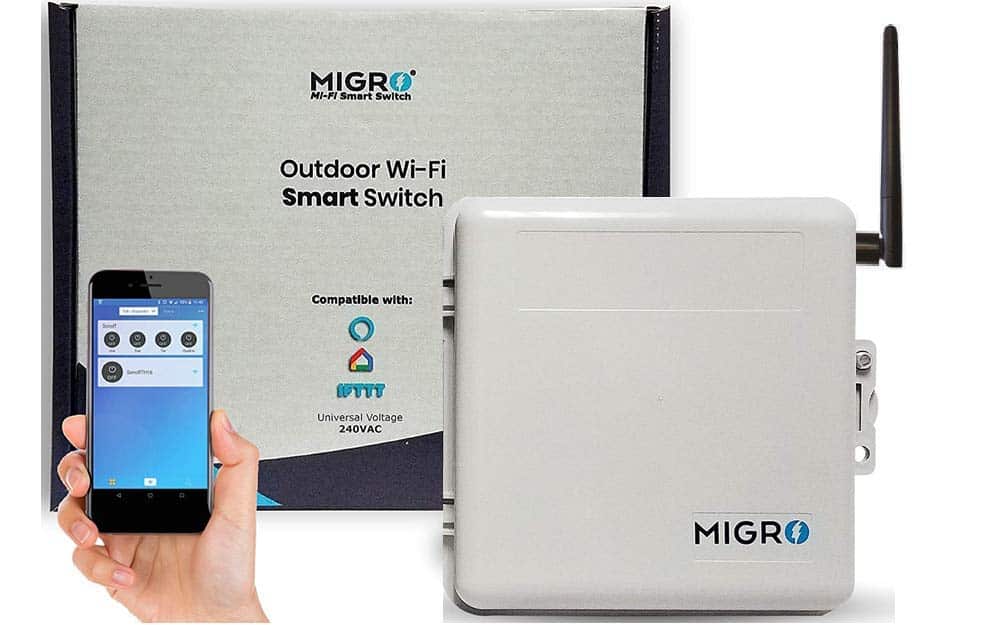
Pool Heater Heavy Duty 50A Resistive 240VAC 40A Outdoor Smart Wi-Fi Outlet Box
Wi-Fi vs Cellular Smart Hot Tub Controllers
Both approaches let you reach the spa remotely, but they solve connectivity differently.
Wi-Fi and Home-Network Systems
A Wi-Fi-based controller depends on your home internet connection and some form of communication between the spa and router.
This may be a good fit when:
- the hot tub sits close to the house
- backyard network coverage is reliable
- you do not want a cellular service plan
- your spa already supports the manufacturer’s Wi-Fi module
Gecko in.touch 3 uses a spa-side module and a home module connected to the home router. Gecko recommends connecting the home module to the main router and checking signal quality if the two modules are far apart.
Hot Spring’s Connected Spa Kit also relies on Wi-Fi components between the spa and home network.
Cellular Smart Hot Tub Systems
Cellular systems reduce dependence on backyard Wi-Fi coverage.
Jacuzzi describes SmartTub as a cellular-based remote system that can control temperature, jets, lights, schedules, locks, energy features, and alerts. Its current product information also notes that cellular service subscriptions apply after the included service period on applicable models.
Sundance SmartTub also uses cellular connectivity and newer versions can use cellular and Wi-Fi connectivity depending on the system and signal.
Cellular can be especially useful when the spa is far from the house, but check coverage and ongoing service requirements before choosing it.
What Can You Actually Control From a Hot Tub App?
The exact controls depend on the hot tub and controller.
Common app functions include:
Temperature
Remote temperature control is one of the most useful features.
It lets you reduce the set point when the spa will not be used for a while, then check or adjust it before your next soak.
Jets and Pumps
Some systems allow pump or jet operation from the app.
Balboa ControlMySpa, Jacuzzi SmartTub, Sundance SmartTub, and compatible Hot Spring systems all advertise varying levels of pump, jet, or spa-function control.
Lighting
Lighting control is common on compatible smart systems.
This can be useful if you want the spa ready before walking outside at night.
Scheduling
Scheduling is more valuable than it sounds.
Rather than changing settings every time you use the spa, compatible systems can automate selected heating, filtration, or usage routines.
Alerts and Diagnostics
A remote alert can tell you something needs attention before your next planned soak.
Depending on the system, this may include:
- power interruption
- temperature issue
- maintenance reminder
- controller error
- connectivity issue
- freeze or overheat warning
Jacuzzi and Sundance also provide dealer-related diagnostic features through SmartTub.
Remote monitoring is still not a substitute for physically checking the spa. Jacuzzi and Hot Spring both explicitly state that their remote systems do not replace regular inspection and maintenance.
Smart Controller vs Smart Water Monitor
A smart controller and a smart water monitor solve different problems.
| Device | Main job |
|---|---|
| Smart hot tub controller | Operates or monitors spa equipment |
| Smart water monitor | Measures water chemistry |
| Connected dosing system | Measures chemistry and may help dispense treatment on compatible equipment |
Buying a Wi-Fi controller does not automatically give you pH or sanitizer testing.
Some newer manufacturer ecosystems can integrate water-care features. Hot Spring, for example, lists pH, chlorine, salt monitoring, and precision dosing when compatible FreshWater equipment is installed.
For standalone chemistry technology, compare the smart hot tub water monitoring options rather than expecting a controller module to handle both jobs.
Is a Smart Hot Tub Controller Worth It?
A smart controller makes the most sense when remote access solves a real ownership problem.
It May Be Worth Adding If:
- your spa is at a second home
- you travel frequently
- winter temperatures make equipment alerts useful
- the spa is far from the house
- you change temperature based on your schedule
- you want remote status checks before using the tub
- dealer diagnostics are available on your system
- your existing control pack supports an easy retrofit
It May Not Be Worth It If:
- you use the spa daily at a constant temperature
- the topside panel is already convenient
- your older spa requires a major control-pack replacement
- remote functions are very limited on your model
- your internet or cellular coverage is poor
- the required subscription costs more than the convenience is worth to you
A $200 or $300 connectivity upgrade is a very different decision from replacing an entire control system. Get the compatibility answer first, then compare cost.
For other lower-complexity upgrades, see our list of useful hot tub accessories.
Can a Smart Controller Lower Hot Tub Energy Use?
A smart controller can help manage when and how the spa operates, but the controller itself does not make the heater more efficient.
The biggest value is better control over temperature, schedules, and away modes.
Jacuzzi SmartTub includes energy tracking and Smart Heat features, while Sundance promotes similar scheduling and energy-management tools. Manufacturer claims about savings apply to their specific systems and operating modes, not to every hot tub controller.
Actual hot tub energy use still depends heavily on:
- insulation
- cover condition
- outside temperature
- water temperature setting
- spa size
- heater efficiency
- filtration schedule
- wind exposure
- how often the cover is opened
If reducing operating cost is the main goal, work through the broader hot tub energy-saving steps instead of relying on app control alone.
Smart Home Integration Is Not Universal
Voice control and home-automation support varies by manufacturer.
Jacuzzi currently lists integration with Siri, Alexa, Google Assistant, and compatible wearables for SmartTub systems. Gecko documents a Home Assistant option for in.touch 3, although Gecko describes that integration as community-supported rather than a standard built-in feature.
Do not assume a controller supports Alexa or Google Home simply because it has a mobile app.
For speakers, lighting, entertainment, voice assistants, and other backyard technology, our smart hot tub integration ideas cover that broader setup separately.
Installing a Smart Hot Tub Controller Safely
Some connectivity upgrades are designed as manufacturer-approved modules that connect to an existing spa control system. That does not make every installation a simple DIY job.
Before touching the equipment compartment:
- Confirm the exact compatible module.
- Read the manufacturer installation instructions.
- Identify whether the installation requires access to powered electrical equipment.
- Follow the spa manufacturer’s shutdown procedure.
- Use only approved cables, connectors, and modules.
- Contact the dealer or qualified spa technician when the installation involves electrical servicing or control-pack changes.
Gecko’s current in.touch 3 specifications state that the module must use manufacturer-specified control-pack connections, power should be off before connecting or servicing, and internal servicing should be referred to qualified personnel.
Do not replace a manufacturer-approved spa controller with a generic smart outlet or general-purpose 240V switch. A hot tub is not the same load as a lamp, patio light, or ordinary plug-in appliance.
Smart Hot Tub Controller Not Connecting? Check These First
Connection problems are often easier to diagnose when you separate the spa side from the network side.
1. Confirm the Hardware Is Compatible
An app cannot solve a hardware mismatch.
Check the control-pack model and module version again before troubleshooting the router.
2. Confirm the Correct App
Older controller generations may use different apps.
Gecko, for example, says in.touch 2 and in.touch 3 use different app platforms.
3. Check the Module Status Lights
Many modules use LEDs to show:
- power
- pairing
- internet connection
- communication with the spa
- error state
Read the manufacturer’s LED chart instead of guessing what the color means.
4. Check Router and Signal Placement
A hot tub cabinet contains equipment, insulation, wiring, and sometimes metal surfaces that can affect communication.
Gecko recommends placing its home module near the main router, avoiding metal obstructions, and checking signal strength in the app.
5. Confirm Internet or Cellular Service
A cloud-connected spa cannot communicate remotely if the required internet or cellular connection is down.
Cellular systems also depend on supported coverage in your location.
6. Restart Only as the Manufacturer Recommends
Avoid repeatedly cutting power to the spa as a general troubleshooting tactic.
Follow the reset or reconnection sequence documented for your specific controller.
7. Contact the Manufacturer or Dealer
Have these details ready:
- spa model
- model year
- serial number
- controller model
- smart module model
- app version
- LED status
- exact error message
That information can shorten the troubleshooting process significantly.
Common Smart Controller Buying Mistakes
Buying by Spa Brand Alone
Two spas from the same brand may use different electronics.
Always verify the control-pack model.
Assuming Every Controller Uses Wi-Fi
Jacuzzi and Sundance SmartTub systems use cellular connectivity as part of their remote-control platform. Other systems depend more heavily on a home network.
Ignoring Subscription Costs
Some cellular systems require ongoing service fees after an included period.
Check the current subscription terms before purchasing the hardware.
Expecting Water Chemistry Readings
App control does not automatically mean pH, chlorine, bromine, or salt monitoring.
Treat water monitoring as a separate feature unless the manufacturer’s documentation specifically confirms it.
Choosing Features Before Compatibility
It is easy to compare apps and pick the one with the nicest feature list.
That order is backward.
Start with your control pack. The compatible hardware determines your shortlist.
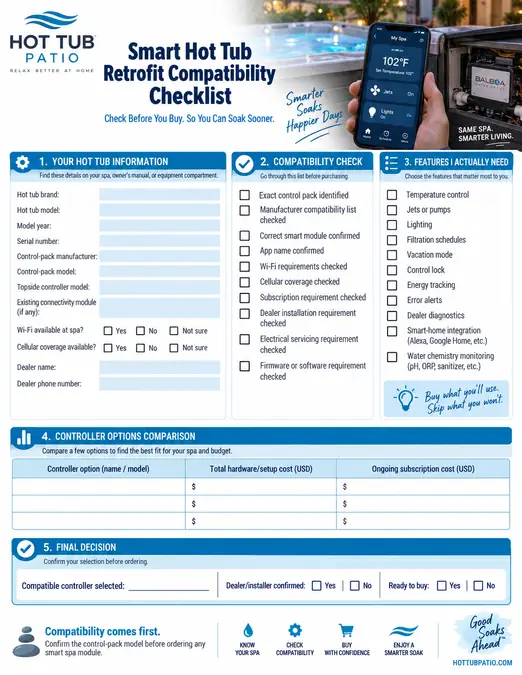
Tailored Action Plan
Use this quick workflow before spending money on any smart hot tub upgrade.
If You Already Own the Hot Tub
- Photograph the spa control-pack label.
- Record the spa brand, model, year, and serial number.
- Check the controller manufacturer’s official compatibility list.
- Write down the three remote functions you actually want.
- Check Wi-Fi signal or cellular coverage at the spa location.
- Ask about hardware, installation, and subscription costs.
- Confirm whether dealer installation is required.
- Buy only after the exact module has been matched to your spa.
If You Are Shopping for a New Hot Tub
Add smart-control questions to your dealer checklist:
- Is remote control standard or optional?
- Does it use Wi-Fi, cellular, or both?
- Which functions can the app control?
- Does it provide error alerts?
- Can my dealer access diagnostics?
- Is there a subscription?
- Can the system be upgraded later?
- What happens if the cloud service or internet is unavailable?
If the Spa Is at a Vacation Home
Prioritize:
- reliable remote temperature checks
- outage alerts
- freeze-related notifications
- remote lock features
- dealer diagnostics
- strong cellular or internet connectivity
Remote control can make a second-home or rental-property workflow easier, but someone still needs to physically inspect and maintain the spa on a regular schedule.
If Energy Cost Is Your Main Concern
Do not buy a controller solely because it advertises energy features.
First inspect:
- cover condition
- insulation
- temperature setting
- filtration schedule
- equipment condition
- standby habits
Then decide if scheduling and remote temperature control will improve the way you already operate the spa.
Downloadable Resource
Frequently Asked Questions
Can I make an old hot tub smart?
Sometimes. Older spas may support a retrofit module if the control pack is compatible, while others may need a control-system upgrade that is not worth the cost.
How do I know which Wi-Fi controller fits my hot tub?
Find the manufacturer and model number on the spa’s control pack, then check the controller manufacturer’s compatibility list. Do not choose a module based only on the hot tub brand.
Can I control my hot tub from my phone?
Yes, if your spa has a compatible connected controller. Depending on the system, the app may control temperature, jets, lights, schedules, locks, or other functions.
Do smart hot tub controllers require Wi-Fi?
Not all of them. Some use home-network connections, while SmartTub systems from Jacuzzi and Sundance use cellular connectivity and, on newer systems, may combine cellular and Wi-Fi capabilities.
Do smart hot tub apps require a subscription?
Some do. Cellular systems may require an ongoing service subscription after an initial included period, while other controller ecosystems may use your existing home internet connection.
Can Alexa or Google Home control a hot tub?
Some compatible systems support voice assistants, but the feature is not universal. Jacuzzi currently lists Siri, Alexa, and Google Assistant integration for SmartTub.
Can a smart hot tub controller monitor water chemistry?
Some connected spa ecosystems can integrate compatible water-care equipment, but many smart controllers only manage spa equipment. Use a dedicated water-monitoring system when chemistry tracking is the main goal.
Can I install a hot tub Wi-Fi module myself?
That depends on the manufacturer and the installation. If the job involves opening or servicing electrical equipment, changing the control pack, or making connections beyond a manufacturer-approved user installation, use a qualified spa technician.
Choose Compatibility Before Features
A smart hot tub controller is useful when it makes ownership easier, not when it simply adds another app to your phone.
Find your control-pack model first. Once you know which systems are actually compatible, compare remote features, network requirements, subscriptions, and installation needs. That simple order prevents most smart-controller buying mistakes and makes it much easier to choose an upgrade that will work with your spa.

3 Comments
Comments are closed.